Copilot vs ChatGPT: We Gave Both the Same 8 Work Tasks
Copilot vs ChatGPT tested on Excel formulas, email summaries, slides and live facts. See which got it right, what each costs and which fits your work.
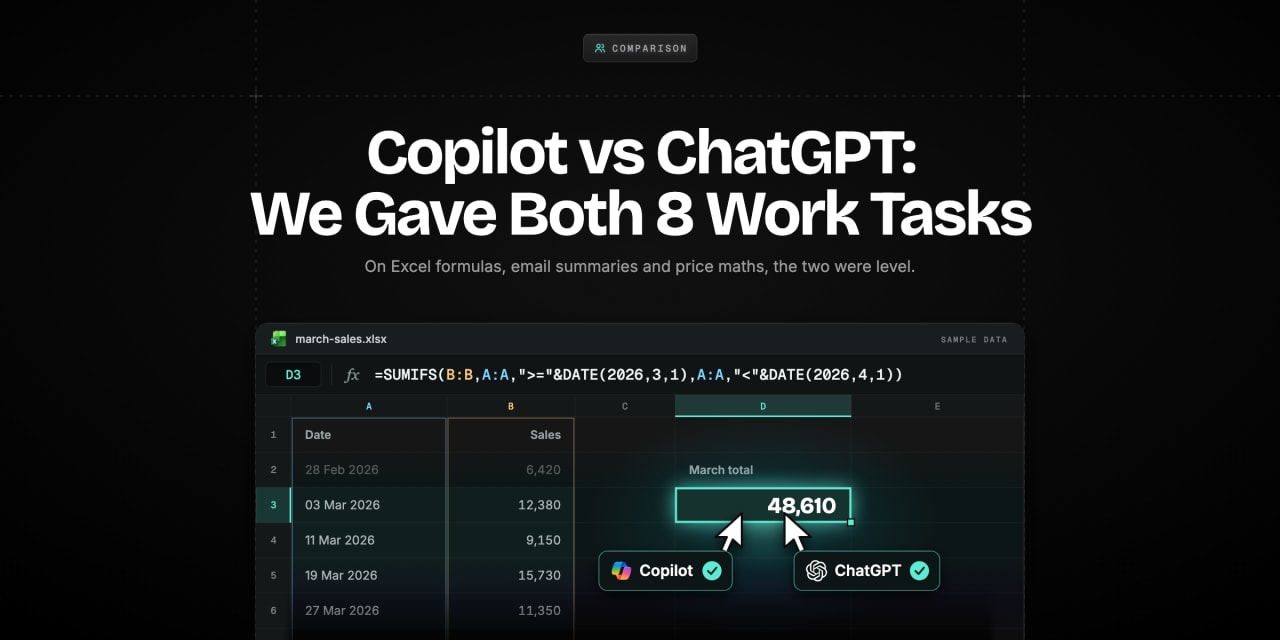
SummaryChatGPT got all 8 of our work tasks right and Copilot got 7, slipping on a UK wage rate and its own word counts. Copilot makes sense inside Microsoft 365; ChatGPT is the stronger standalone assistant.
Read moreShow less
Key Highlights
- We ran our own test on 1 November 2026: eight everyday work tasks, typed word for word into Microsoft Copilot and ChatGPT, each with a right answer we could check.
- ChatGPT got all eight right. Copilot got seven, and the one it missed was a live fact: it quoted next April's UK minimum wage as today's rate.
- On Excel formulas, email summaries and the price maths, the two were level. Both wrote correct SUMIFS and XLOOKUP formulas and both worked out a 2.6% revenue rise.
- ChatGPT tended to add a useful extra nobody asked for. Copilot tended to stick tightly to the brief, which sometimes made its output cleaner.
- Copilot's free plan asked us to verify we were human after six chats and hit a daily limit after ten.
- If your work lives in Word, Excel, Outlook and Teams, Copilot's business plans plug straight into them. If it doesn't, ChatGPT is the more complete standalone assistant.
Microsoft has put a lot of money behind the idea that AI saves office workers time, and its own research backs the claim. A study shows that across 66 firms and 7,137 knowledge workers, people given Microsoft 365 Copilot spent two fewer hours a week on email. That's a real number, but it was measured by Microsoft researchers, inside Microsoft's own apps.
What most people actually want to know is simpler. If you sit down with a spreadsheet, a long email thread or a deck due on Friday, which assistant gives you the right answer first time? Reviews tend to compare feature lists. We wanted to compare the work itself.
So we gave Copilot and ChatGPT the same eight tasks, with answers we could check, and scored them. Below you'll find the results task by task, what each one costs, where Copilot's Microsoft 365 link really matters, and a quick guide to choosing.
Copilot vs ChatGPT: Which One Should You Pick?
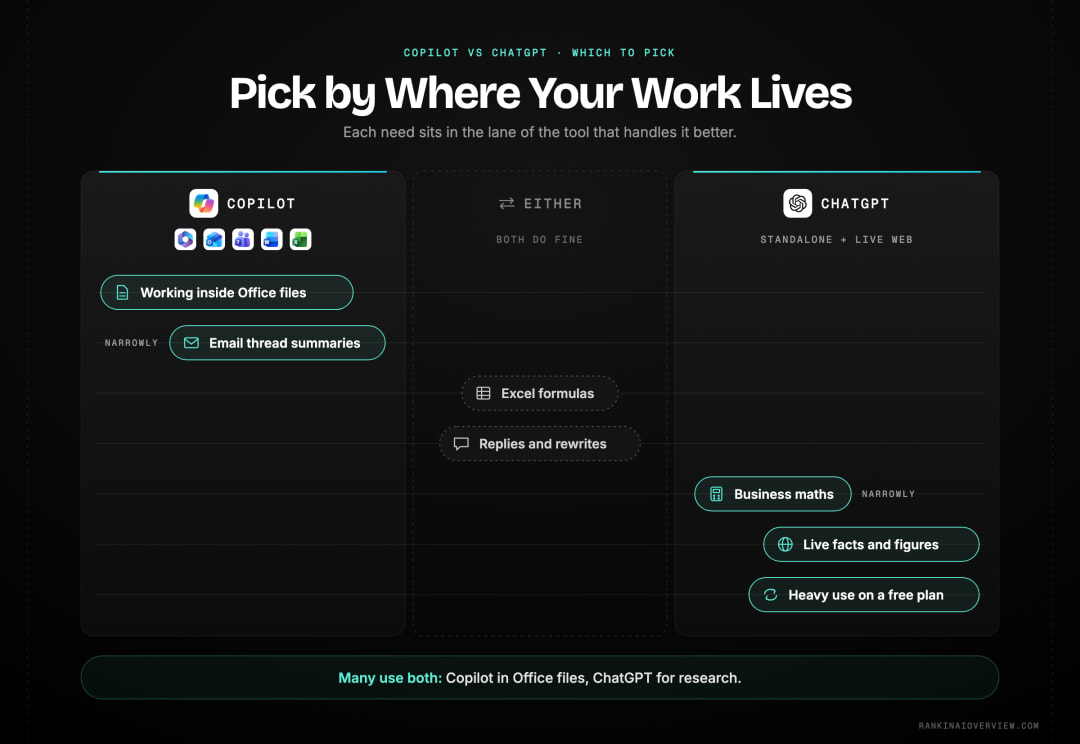
Pick by where your work happens. Copilot makes the most sense when you already pay for Microsoft 365 and want help inside Word, Excel, Outlook and Teams. ChatGPT makes more sense as a standalone assistant for writing, analysis, research and anything outside the Microsoft apps.
| If you mainly need... | Better pick | Why, from our test |
|---|---|---|
| Excel formulas | Either | Both wrote correct formulas for both tasks |
| Email thread summaries | Copilot, narrowly | Both found all four action items; ChatGPT added statuses that weren't in the thread |
| Short replies and rewrites | Either | Both met the word limits; Copilot kept the original meaning more closely |
| Business maths | ChatGPT, narrowly | Both were right; ChatGPT also gave the break-even point unprompted |
| Live facts and figures | ChatGPT | Copilot gave a future rate as the current one |
| Working inside Office files | Copilot (paid business plans) | It's built into the apps your files live in |
| Heavy daily use on a free plan | ChatGPT | Copilot's free plan capped us at ten chats in a day |
What's the Real Difference Between Copilot and ChatGPT?
ChatGPT is OpenAI's own assistant, a standalone app you open to get something done. Microsoft Copilot is Microsoft's assistant, spread across Windows, the Edge browser, Bing and, on paid plans, the Microsoft 365 apps.
Are they built on the same technology?
They're closely linked. Microsoft is one of OpenAI's biggest backers and Copilot has long used OpenAI models alongside Microsoft's own work. In daily use, though, they behave differently, because each company wraps the models in its own search, safety rules and interface. Our test shows that clearly, so don't assume one is a rebadged version of the other.
Where does each one get its web answers?
Copilot's web answers lean on Microsoft's Bing search. ChatGPT runs its own search inside the chat and shows sources as small citation pills. That difference matters for anyone who wants their brand mentioned, and we come back to it near the end.
Why does the Microsoft 365 link matter so much?
Because that's where Copilot earns its keep at work. On business plans, Copilot can work inside Word, Excel, PowerPoint, Outlook and Teams, using your files, emails and meetings. ChatGPT can connect to some outside tools, but it doesn't sit inside Office the same way.
How Did We Test Copilot and ChatGPT?
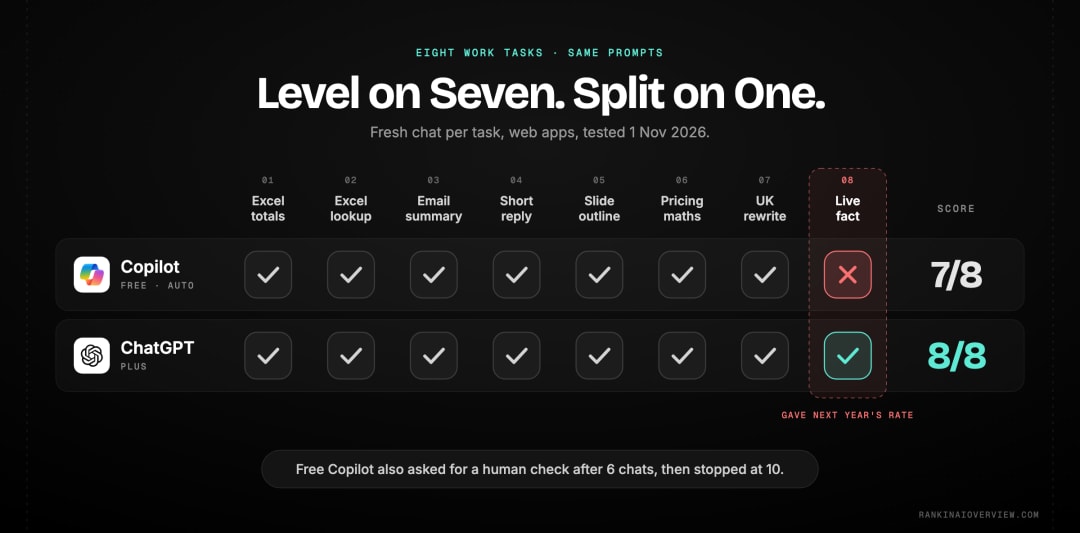
We picked eight tasks an office worker might do on any given week. Each one had a right answer or a rule we could count, so the scoring didn't rest on our taste. We typed the same words into both, in a fresh chat each time, on 1 November 2026.
What were the eight tasks?
| Task | What we asked | How we scored it |
|---|---|---|
| 1. Excel totals | Total March 2026 sales from dates in column A and sales in column B | Correct formula or not |
| 2. Excel lookup | Return a price from Sheet2, or "not found" if missing | Correct formula or not |
| 3. Email summary | Summarise a four-message thread and list action items with owners | Items found out of 4, owners right, nothing invented |
| 4. Short reply | Decline a Tuesday 3pm meeting, offer Wednesday or Thursday morning, under 80 words | Word count and both alternatives |
| 5. Slide outline | A 10-slide quarterly sales review for a manager | Exactly 10 slides |
| 6. Pricing maths | Raise prices 8%, lose 5% of customers: revenue up or down? | Right answer is up 2.6% |
| 7. Rewrite | A 23-word US English sentence, rewritten in under 50 words of UK English | Word count and spelling |
| 8. Live fact | The UK minimum wage for over-21s "right now" | Checked against gov.uk on the day |
What setup did we use?
We used the regular web apps in Chrome, from India. Copilot was on a free personal Microsoft account in its default "Auto" mode. ChatGPT was on a Plus plan with its default thinking setting. That's a real difference, and it's the fairest way to read our results: free Copilot against paid ChatGPT, which is how many people meet the two.
What did the scorecard look like?
| Task | Copilot | ChatGPT |
|---|---|---|
| 1. Excel totals | Correct | Correct |
| 2. Excel lookup | Correct | Correct |
| 3. Email summary | 4 of 4, nothing added | 4 of 4, added a status column |
| 4. Short reply | 42 words, both options | 42 words, both options |
| 5. Slide outline | 10 slides | 10 slides |
| 6. Pricing maths | Up 2.6% | Up 2.6%, plus break-even |
| 7. Rewrite | 21 words, full UK spelling, miscounted its own words | 20 words, UK spelling, meaning shifted slightly |
| 8. Live fact | Wrong | Correct |
Which Is Better for Excel and Numbers?
On our three number tasks, it was a draw on accuracy. Both gave correct formulas and the right revenue answer. The difference was in how much each one explained around the answer.
How did they handle the Excel formulas?
For the March total, both wrote the same SUMIFS formula, using the first of March as the start and the first of April as the cut-off. ChatGPT added a short note on why using "before 1 April" also catches dates with times attached, which is a genuinely useful point for messy exports. Copilot gave a second formula, a SUMPRODUCT version, as a backup.
For the lookup, both suggested XLOOKUP with "Not Found" built in, and both offered an IFERROR and VLOOKUP version for older Excel. Copilot added a small worked example table showing a found and a missing code. Either answer would have worked first time.
Who did the business maths better?
Both said revenue rises by 2.6%, which is right: 1.08 times 0.95 is 1.026. ChatGPT went a step further without being asked. It worked out that you could lose up to 7.41% of customers before an 8% price rise stops paying off, and stated its assumption that each customer keeps buying the same amount. We checked the 7.41% figure and it holds.
Copilot's answer was correct and clearly laid out, and it offered the break-even calculation as a follow-up button rather than in the answer. If you think in "what if" questions, ChatGPT's habit of answering the next question too saves a step.
Did currency make a difference?
A small one. We didn't name a currency, and Copilot worked the example in dollars. ChatGPT worked it in rupees, matching where we were testing from. Neither is wrong, but it shows ChatGPT leaning harder on your location.
Which Is Better for Email and Writing?
Close again, with a different strength on each side. Copilot was the more literal of the two, which helped with the summary and the rewrite. ChatGPT was more helpful around the edges but added a detail we hadn't given it.
How accurate were the email summaries?
Our thread had four action items: Sam confirming a £4,500 budget with finance by Wednesday, Priya getting two venue quotes by Thursday, Tom sending a new deck on Friday, and Priya booking catering once the budget was confirmed. Both tools found all four, with the right owners and deadlines, and both spotted that the catering depended on Sam.
The difference was small but telling. ChatGPT's table had an extra "Status" column, marking items "In progress" and "Blocked". Nothing in the thread said that. It's a reasonable guess, but in a summary you'll forward to a client, a confident guess can cause trouble. Copilot stuck to what was written.
"workers who make use of this technology spent half an hour less reading email each week and completed documents 12% faster." Eleanor Wiske Dillon, Sonia Jaffe, Sida Peng and Alexia Cambon, Microsoft researchers, on early Microsoft 365 Copilot users. Source: arXiv, Early Impacts of M365 Copilot
That saving only counts if the summary is right, which is why the "nothing added" score matters as much as the "items found" one.
How did the short replies compare?
Both declined the meeting politely, offered Wednesday or Thursday morning, and came in at 42 words, well under our 80-word cap. ChatGPT presented its reply as an email draft with a subject line and a prompt to connect an email account. Copilot gave plain text you could paste anywhere. Copilot wrote the time as "3:00 PM"; ChatGPT wrote "3 PM".
Which rewrite was better?
We gave both a clunky US English sentence about "optimizing our program" and "customer favorites" and asked for UK English in under 50 words. Copilot did a clean conversion: optimising, programme, colour, favourites, with the meaning intact, in two versions of 21 words each. Oddly, it labelled them "17 words" and "18 words". The output passed, but its own count was wrong.
ChatGPT gave one 20-word version with "colour" and avoided the other US spellings by rewording. In doing so, "programme" turned into "approach" and "going forward" disappeared. It reads well, but it isn't quite the same sentence.
Also read: The six metrics that show how visible you are in AI search
Which Is Better for Presentations?
Both delivered exactly ten slides, so both passed. They took different routes to get there, and which you'd prefer depends on how you work.
What did Copilot's outline look like?
Copilot gave ten content slides, each with a purpose line, bullet points and a suggested chart. It opened with an executive summary and closed with requests for support, and it ended with a one-line flow: results, drivers, opportunities, risks, plan. It's the kind of outline you could paste straight into PowerPoint's own Copilot.
What did ChatGPT's outline look like?
ChatGPT put the ten slides into a table with a title, content and visual for each, starting with a title slide. It then drew a sample dashboard, with made-up revenue figures clearly labelled as sample data, and suggested using conclusion-led slide titles. It's more of a coaching answer than a pure outline.
Does Copilot build the actual deck?
On paid Microsoft 365 plans, Copilot can work inside PowerPoint itself. That's the strongest argument for Copilot on presentation work, and it's something our web test didn't cover. If you live in PowerPoint, weigh that more heavily than the outlines above.
Which Gets Live Facts and Sources Right?
ChatGPT, in our test. This was the one task where the two split on accuracy, and it was a fact that's easy to check.
What went wrong on the minimum wage question?
We asked for the UK minimum wage for over-21s "right now". The gov.uk rates page showed £12.71 an hour, in force from 1 April 2026. ChatGPT gave £12.71, said when it applied, cited GOV.UK and worked out the yearly figure correctly.
Copilot answered £13.21, which is the rate due from 1 April 2027. Its own sentence even said "from 1 April 2027", while calling it the current rate. Anyone checking their payslip against that answer would think they were underpaid.
What did Copilot show as its sources?
On a separate laptop question from our wider study, Copilot's sources panel said the answer had "no direct citations". Underneath, it listed 18 related pages, many of them laptop roundups on websites whose names had nothing to do with laptops. On a running shoe question, there was no sources button at all.
Why does that matter for you?
Because a well-written answer can still be out of date or loosely sourced. For anything with a date, a rate or a rule, click through to the source. ChatGPT's citation pills made that quicker in our test.
What Was It Like to Use the Free Plans?
ChatGPT ran every task without friction on the plan we used. Copilot's free plan got in the way twice, and it also asked more questions before answering.
Did Copilot limit how much we could use it?
Yes. After six tasks, Copilot showed "Verification required to continue" and stopped sending messages until the page was reloaded. After ten chats in total, it said we'd reached our daily limit and to come back at 5:30am. If you plan to lean on the free version all day, expect to hit that wall.
Does Copilot ask clarifying questions?
It did on our running shoe question. Before answering, it asked three: our budget, given in rupee bands, our shoe size and fit, and where we usually run. ChatGPT answered the same question straight away. Some people will like the extra care. Others will find it slows things down.
How Much Do Copilot and ChatGPT Cost?
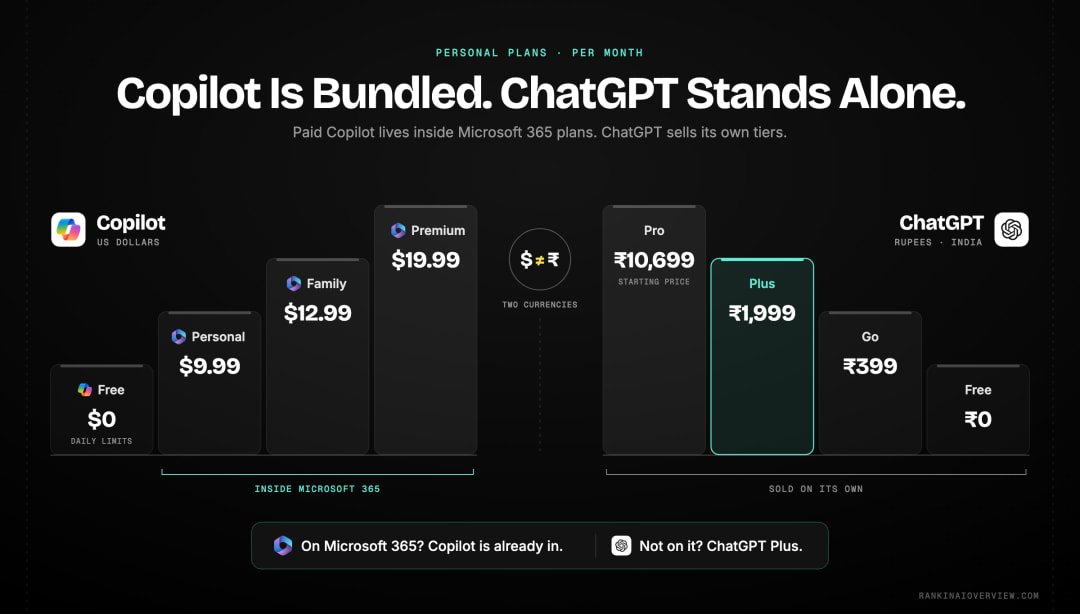
Both have a free tier. For individuals, Microsoft bundles Copilot into its Microsoft 365 home plans, while OpenAI sells ChatGPT plans on their own. For teams, Copilot is mostly an add-on to Microsoft 365 business plans.
What do the personal plans cost?
| Plan | Price | What it adds |
|---|---|---|
| Copilot free | $0 | Copilot chat on the web, Windows and mobile, with daily limits |
| Microsoft 365 Personal | $9.99 a month or $99.99 a year | Office apps for one person, with Copilot in the apps |
| Microsoft 365 Family | $12.99 a month or $129.99 a year | Everything in Personal for a household, with 2 TB of shared storage |
| Microsoft 365 Premium | $19.99 a month or $199.99 a year | Advanced Copilot chat with extensive usage, agent features, more AI image creation |
| ChatGPT Free | ₹0 | Basic access with limits |
| ChatGPT Go | ₹399 a month (India) | Longer conversations |
| ChatGPT Plus | ₹1,999 a month (India) | Advanced work and productivity |
| ChatGPT Pro | From ₹10,699 a month (India) | Highest limits, research and coding |
Microsoft's prices come from its Microsoft 365 plan comparison, in US dollars. ChatGPT's come from OpenAI's pricing page, which showed local prices for India when we checked on 1 November 2026. In the US, Plus has long been $20 a month.
What do the business plans cost?
| Business plan | Price per user per month (paid yearly) |
|---|---|
| Microsoft 365 Copilot Business (add-on) | $21, shown at an offer price of $18 |
| Microsoft 365 Business Standard with Copilot | $23.50 |
| Microsoft 365 Business Premium with Copilot | $32 |
| ChatGPT Business, Standard seat | ₹1,800 (India), or ₹2,250 billed monthly |
| ChatGPT Business, Premium seat | ₹9,000 (India), or ₹11,250 billed monthly |
Microsoft's business figures come from its Copilot business pricing page. The Copilot Business add-on sits on top of an existing Microsoft 365 plan. ChatGPT's business plan is for teams of 2 to 200 people.
Which is better value?
If you already pay for Microsoft 365, Copilot in the apps costs little or nothing extra on home plans, which is hard to beat. If you don't, ChatGPT Plus gets you a stronger standalone assistant for a similar monthly price to Microsoft 365 Premium, without the Office apps.
Should Microsoft 365 Users Choose Copilot?
Usually, yes, at least for work inside the apps. The value of Copilot rises sharply once it can see your documents, inbox and meetings, and that's something ChatGPT can't match from the outside.
When does Copilot clearly win?
- You spend most of the day in Outlook, Teams, Word and Excel.
- Your company already has Microsoft 365 business licences and its data rules.
- You want summaries of meetings and threads without copying text into another tool.
Microsoft also points out on its business page that people with a work account can try Copilot Chat even before their company buys Copilot licences.
When is ChatGPT the better choice even for Microsoft users?
- You need careful reasoning, extra analysis or a second opinion on a draft.
- You work across lots of tools, not mainly Office.
- You want live facts checked against sources, where ChatGPT did better in our test.
Can you use both?
Plenty of people do. A common split is Copilot for anything inside Office files, and ChatGPT for thinking, research and writing that starts from a blank page. Just keep company data rules in mind before pasting work content into any tool.
What Does Copilot vs ChatGPT Mean for Your Brand's Visibility?
They're separate audiences with separate sources. Copilot's web answers lean on Bing, so a business that ignores Bing may be missing from Copilot even when it does well on Google. ChatGPT runs its own search and shows its sources as pills, so you can see more easily whether you were used.
What should you do about Bing?
Make sure your site is verified in Bing Webmaster Tools and that your key pages are indexed there. It takes an hour and it's one of the few direct levers you have on what Copilot can find.
How do you check whether either one mentions you?
Ask both the questions your buyers ask, in the way they'd type them, and note whether you're named and whether you're cited. Do it more than once, because single answers move around. In our wider test across ChatGPT, Perplexity and Grok, the engines rarely cited the same sites.
Also read: The best tools for tracking your ChatGPT visibility
Conclusion
On everyday work tasks, Copilot and ChatGPT were closer than the marketing suggests. Both handled Excel formulas, email summaries, short replies and pricing maths correctly. ChatGPT was the more complete standalone assistant, adding useful extras and getting the live fact right. Copilot was more literal, which kept its summaries and rewrites faithful, but it slipped on a date-sensitive figure and its free plan ran out quickly.
So the choice comes down to where you work. If your day happens inside Microsoft 365, Copilot belongs in it. If it doesn't, or you want one assistant for everything, ChatGPT is the safer pick. Whichever you use, double-check anything with a date or a rate.
This was one run of eight tasks on one day, with Copilot on its free plan and ChatGPT on Plus. We'll keep adding tasks and publish what changes.
RANK IN AI OVERVIEW tests how ChatGPT, Copilot, Perplexity, Grok and Google's AI Overviews answer real questions, and its AI visibility tool is launching soon. Want to see whether Copilot and ChatGPT recommend your business? Request a free AI visibility audit.
Frequently asked questions
Is Copilot better than ChatGPT?+
Not overall in our test. ChatGPT got all eight work tasks right and Copilot got seven. Copilot is the better fit if you work inside Microsoft 365 apps, where it can use your files, emails and meetings directly.
Is Microsoft Copilot the same as ChatGPT?+
No. They're separate products from separate companies, though Microsoft backs OpenAI and Copilot has used OpenAI models. They search the web differently, follow different rules and gave different answers to several of our tasks.
Is Copilot free?+
Yes, there's a free version on the web, Windows and mobile. In our test it asked for verification after six chats and hit a daily limit after ten. Microsoft 365 home plans add Copilot inside the Office apps.
Can Copilot write Excel formulas?+
Yes. In our test, Copilot wrote correct SUMIFS and XLOOKUP formulas and gave backup versions for older Excel. ChatGPT wrote the same correct formulas, so either will do for everyday spreadsheet help.
Which is better for business?+
Copilot if your company runs on Microsoft 365 and wants AI inside Outlook, Teams and Office files. ChatGPT if you need a strong standalone assistant across many tools. Many teams end up using both for different jobs.
Explore with AI
Share this